Beyond Google: Alternative Search Engines for OSINT
Jemma Ward | Nov 2, 2026 | 14 MIN READ
AI is increasingly used for information retrieval but lots of us, whether through familiarity or preference, still use the traditional search box to find answers. Navigating to the source of information, rather than relying on an AI interpretation or summary, allows OSINT practitioners to verify public information, better understand the context of that information, and discover pivot points. Additionally, using advanced search operators and filters enables us to sort the wheat from the chaff. Search refinement, through targeting specific sites, exact phrases, filetypes, and formats, remains a key OSINT skill.
When it comes to search engines, Google still reigns supreme. It holds its place as the top search engine globally with over 90 percent of search engine market share (Search Engine Market Share). However, the rollout of new features, which we blogged about here: Has (Google’s obsession with) AI ruined Google Dorking?, hasn’t been to everyone’s taste, and the reliability of Google’s advanced search operators has been noticeably wobbly over the past few months. Another concern is Google’s approach to privacy and personalisation. The mass aggregation of data linked to users has long been a concern for many users, and attribution-conscious practitioners may be particularly wary of how aggregated search terms are represented in public search trends via Google Trends.
In this blog, we’ll look at some alternative search engines that can supplement or in some cases replace mainstream providers.
Thinking about Indexes
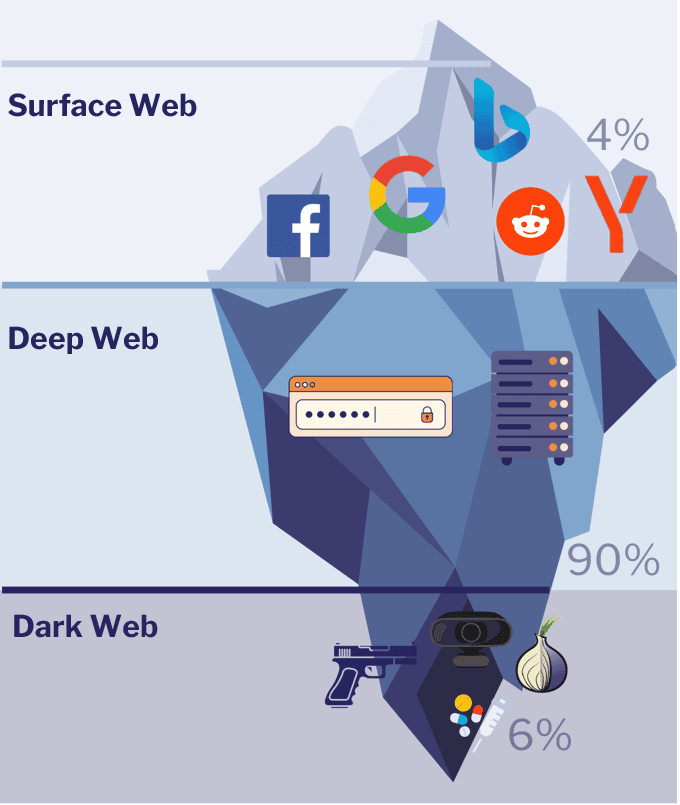
‘Use multiple search engines!’ is a regular piece of advice in the OSINT world. A more apt piece of advice, though, would be to use multiple search indexes. The ‘tip of the iceberg’ analogy is a staple in OSINT training: only a tiny portion of online content is indexed by search engines. This is known as the ‘surface web’ and encompasses any and all pages that can be crawled and indexed by search engines.
Search engines have three main functions:
- Crawling – automated bots or scrapers crawl the clear web and scrape information for the index.
- Indexing – the information scraped by the bots is organised into a database
- Searching – a query entered by a person is interpreted, used to search the index, and the results are returned to the person in a ranked order.
When you search using Google, Bing, Yandex (or whichever obscure search engine you fancy)! you’re not conducting a live search of the internet. Rather, the engine is searching in its index to find matching results. Think of it like this – if you ask a librarian for help finding a book, the librarian (hopefully) won’t wander off and start scanning each shelf one by one. Instead, they will look up the title of that book in the library catalogue. The bigger the library, the higher the likelihood your book will be in the catalogue.
To no-one’s surprise, Google has the largest search index in the world. It contains hundreds of billions of pages, though we don’t know the exact size. The graph below shows the estimated size of selected search engines’ indexes (please note that these are approximate figures based on public sources).
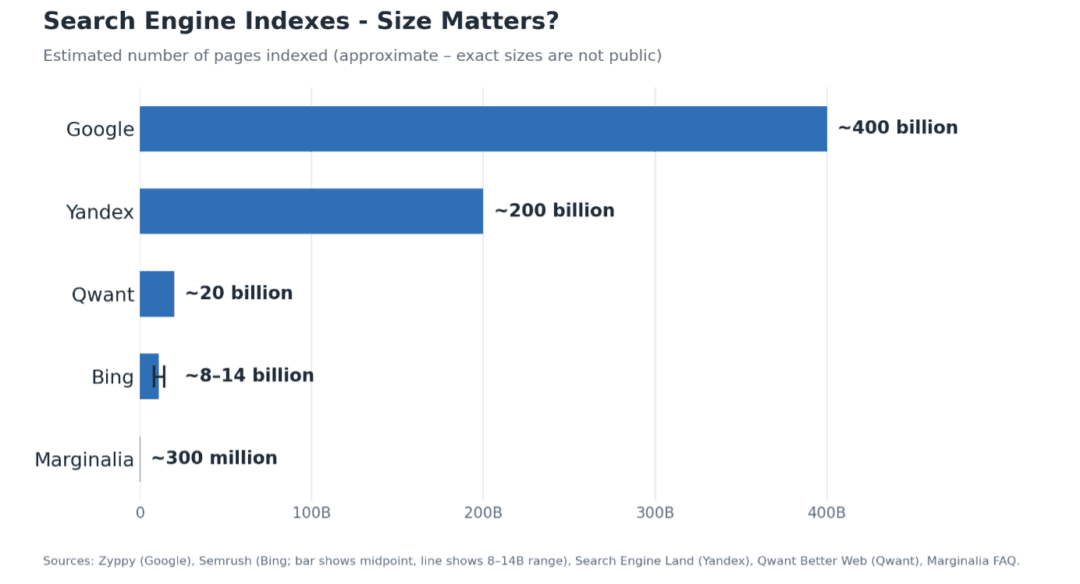
This prompts the question – why use different search engines if Google still indexes such a vast amount of content? One reason, of course, is privacy. In this blog, we’ll look at some alternative search engines that allow users to better manage their footprint while still retrieving solid result sets.
Secondly, Google’s index – while undeniably hefty – doesn’t contain everything on the surface web. Depending on your investigation requirements, the content you’re looking for may not have been crawled by Google, so we’ll also look at search engines with their own crawlers and indexes.
Note: the search engines covered in this blog were largely chosen because OSINT practitioners may not be very familiar with them. The omission of popular search engines like DuckDuckGo and Brave isn’t because we don’t like them, but, rather, most practitioners will already be aware of them
Qwant
This year, search engines have been in the headlines as the European Union seeks to distance itself from US-based technology ‘gatekeepers’ and build technological sovereignty. In June 2026, Brussels announced that the European Parliament would switch its default search engine from Google to Qwant, a measure to bolster the EU’s tech sovereignty (EU Parliament to switch to French search engine from Google in tech sovereignty push).
Qwant, a French search engine launched in 2013, positions itself as a privacy-focused alternative to mainstream browsers, with the tagline ‘The search engine that values you as a user, not as a product’. It has a reasonably clear privacy policy (Qwant Privacy policy) that outlines how and what data is stored for users. A few key pieces of information on Qwant’s approach to user data:
- It does not store any history of individual queries.
- It does not store cookies that facilitate behavioural ad targeting (unless a user with an account consents).
- Queries are encrypted to prevent third-party interception.
- Its services are audited by the CNIL (Commission nationale informatique et libertés), the French data privacy authority.
- It does not alter search results based on the user’s profile or search history.
Users who create accounts can opt in to personalised advertising, though an account (at this stage) is not required. It’s worth noting that Qwant allows authentication via Google and Apple accounts as well. Qwant makes Nord’s list of top 10 privacy-focused browsers for 2026 (Top 10 best private search engines in 2026).
Qwant, along with Ecosia (the next search engine on our list), established the European Search Perspective in 2024, a joint venture to build an independent, privacy-focused European search index. This is another initiative to reduce Europe’s dependence on Google and Microsoft’s search infrastructure (European Search Perspective).
While Qwant has its own crawlers and index, it supplements results with Bing’s index. Unlike Ecosia, Qwant does not readily show which results come from Bing versus its own index, which is mildly frustrating. The search interface is familiar and straightforward – AI summaries are standard, and, like other major search engines, there’s a tab for suggested ‘Other searches’.
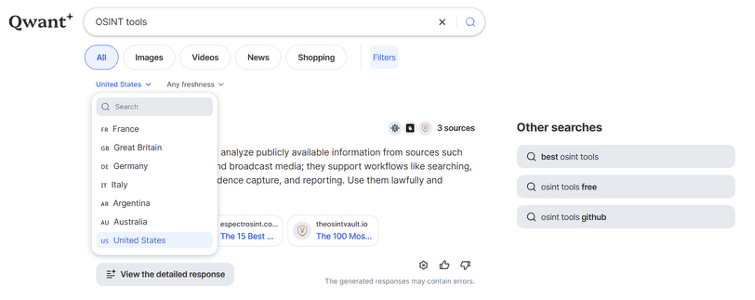
Regional filters are effective at retrieving region-specific results – changing IP location via a VPN does not override the selected region in Qwant, but may result in slightly different result sets.
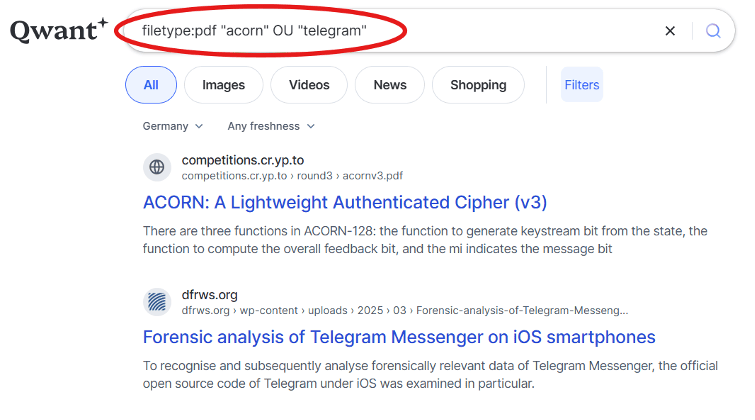
As for advanced searching – Qwant does not publish a guide for its advanced search operators, but most of the common operators (such as site: and filetype:) function to some degree. It also (technically) supports Boolean searching (AND, OR and -). You can conduct Boolean searching in French as well i.e. ET and OU.
Qwant does not support reverse image searching at this point. It’s not a bad choice for basic searching, particularly for European content, but expect results to be quite limited compared to mainstream search engines.
Good for:
- Maintaining privacy and reducing trackers
- Europe-focused results
Not the right choice for:
- Searching Google’s index
- Reverse image searching
- Comprehensive results
Ecosia
Ecosia, another European option, is an interesting player in the alternative search engine space. It describes itself as a ‘not for profit’ search engine, and though it still serves advertisements within its results sets (which are clearly labelled as such) it uses revenue from ad clicks to plant trees (How Ecosia makes money). Pretty cool in theory, although the number of OSINT practitioners who click on ads is probably minimal!
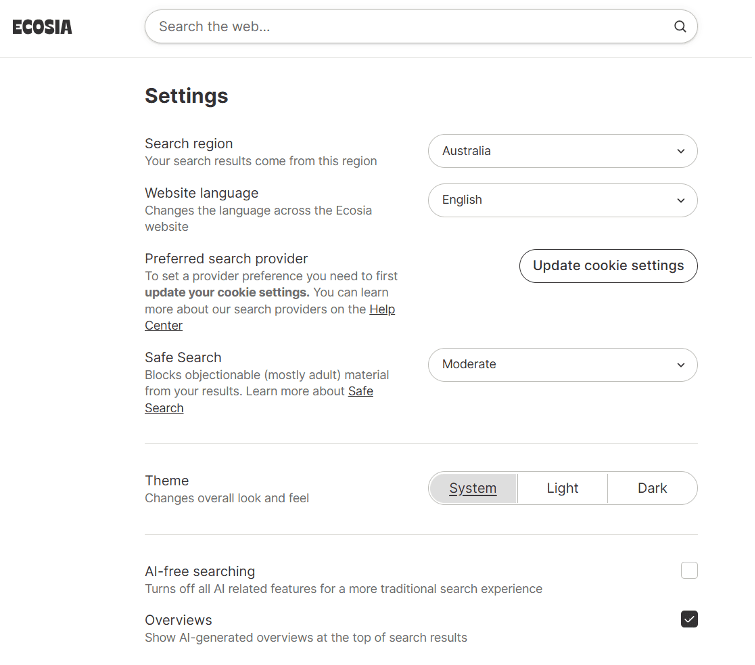
Ecosia is mostly (for now) a meta-search engine, which means that it delivers results from other indexes, primarily Bing and Google. However, the results you retrieve depend on both your region and your cookie settings. Unlike Google, Ecosia allows users to set preferences around AI results and cookies, which makes it an attractive option for those looking to minimise their footprint and search for content without AI summaries. To see the options and set your preferences, head to https://www.ecosia.org/settings.
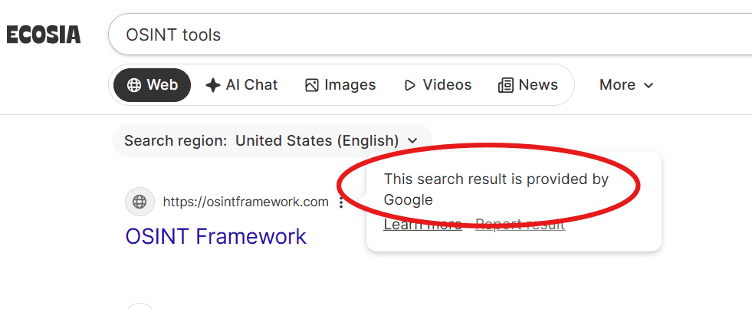
One of the things I like about Ecosia is that it shows which index has provided a result, which Qwant (as we saw above) does not. In Ecosia, just click the three dots to the right of a search result to see if the URL was provided by Google, Bing, or the European Search Perspective index. Result sets are dependent upon your region (Search Result Providers). Outside of Europe, results are usually provided by Google. The screenshot below reflects a US-based search while using a US IP.
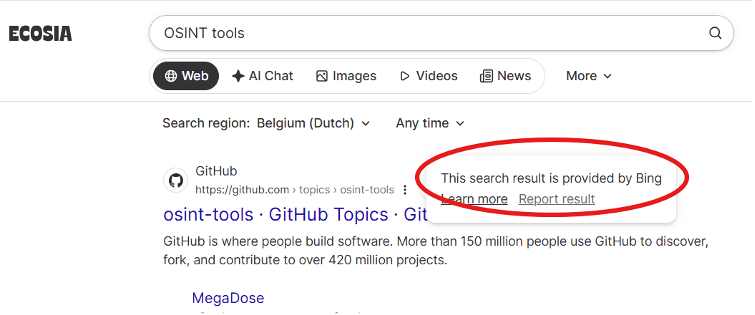
The same search, when performed from a European IP address, only retrieves results from Bing.
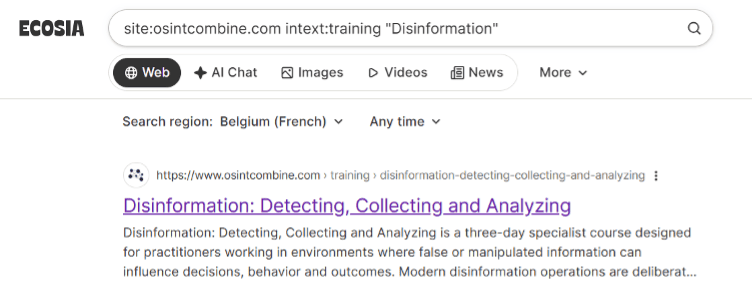
Ecosia’s search functionality is on par with Qwant, though its filters are mainly for targeting specific sources such as Wikipedia, YouTube, Google and Bing. It supports Boolean and advanced searching. If you’re using Ecosia from a region that retrieves Bing results, refer to Bing’s advanced operators (Bing Advanced Search Keywords). If using from a region supported by Google, then use Google’s (Refine Google searches). In the example below, we used the site: and intext: operators, along with an exact phrase, to refine a search.
The key thing to remember is that Ecosia’s performance is dependent on a user’s region, so your mileage may vary. If you’re after an alternative search engine that still uses Google’s index, and you’re either based outside of Europe or have access to a VPN, Ecosia is a good option.
Good for:
- Retrieving Google results without using Google
- Retrieving region-based results
- Cookie control and privacy
Not the right choice for:
- Niche or fringe content not indexed by Google or Bing
- Searching in certain regions or without a VPN
Self-Hosted Searching with SearXNG
SearXNGis the most well-known self-hosted search option. It’s heavily customisable and can retrieve results from multiple search indexes (including Google and Bing) as well as function as a search endpoint for AI. It doesn’t collect user data and can be hosted locally on a user’s machine or within a VM. Data can also be routed through the Tor network for added obfuscation. However, it does require a bit of set up, either through a Docker container or through an installation script.
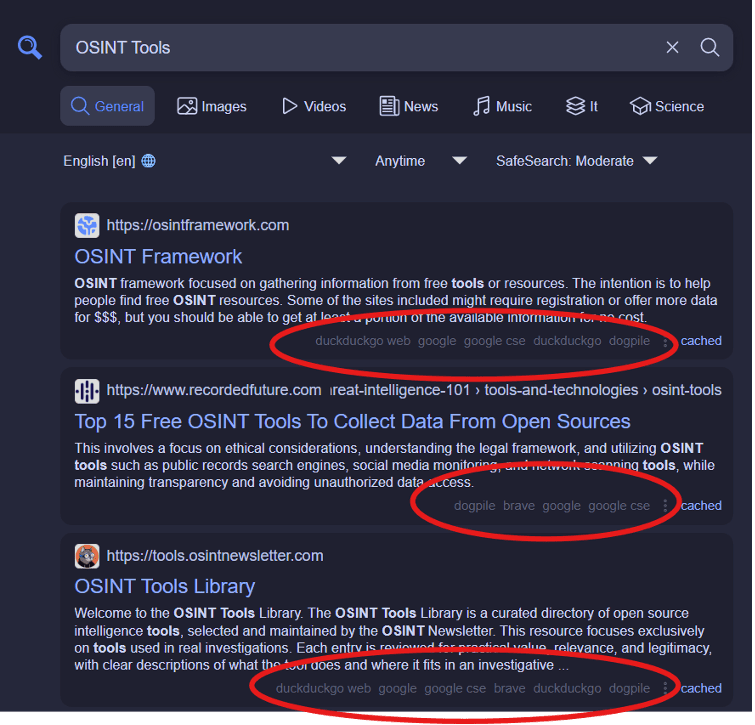
To preview results that can be retrieved from SearXNG, use one of the publicly hosted instances here: https://searx.space/ SearXNG result sets show both the index that a result was retrieved from and, if available, a link to an archived result on the Internet Archive’s Wayback Machine.
Good for:
- Complete control over user data
- Retrieving results from multiple indexes
- Cached results from Wayback Machine
Not the right choice for:
- Instant browser-based searching without set-up
Marginalia Search
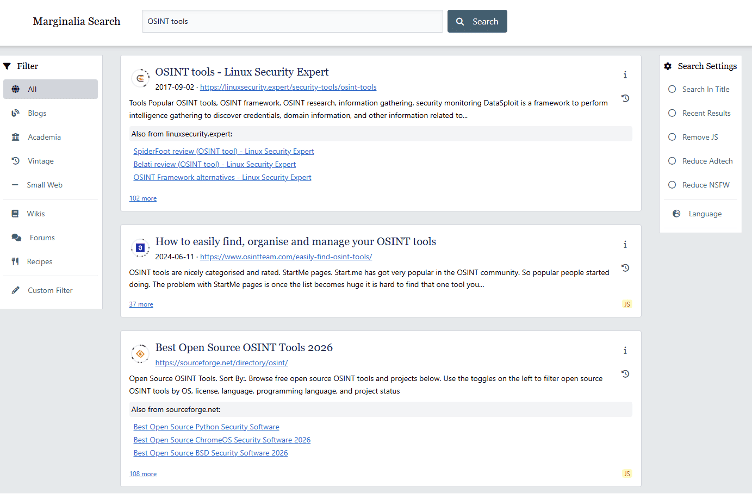
Marginalia is an open-source search engine, so anyone can examine the underlying code and sources on their Github page. Marginalia’s ‘overarching goal is to elevate the more human, non-commercial sides of the Internet’. While it has neither the largest index nor the most easily navigable interface, Marginalia does a brilliant job of retrieving small web, non-commercial results that would otherwise be relegated to the very last page of Google. It’s almost addictive, in fact. A basic keyword search for ‘OSINT tools’, for example, retrieved a completely different set of first page results compared to Google. Results were non-commercial but highly relevant, and both forums and blogs were heavily represented as sources.
Google, on the other hand, first provided an AI summary, then a series of forum posts, and then a ‘People also ask’ section. This isn’t inherently bad – but it did mean we had to keep scrolling to see the full set of results, the first few pages of which were mostly commercial, SEO-driven websites, or Reddit discussions.
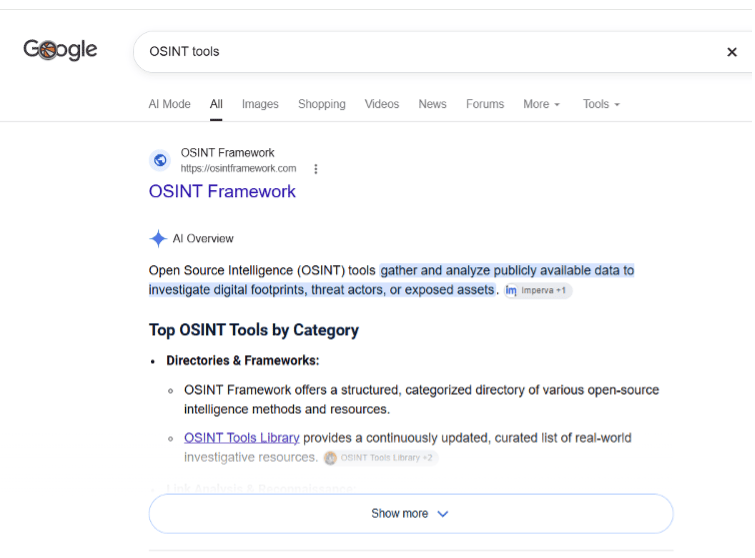
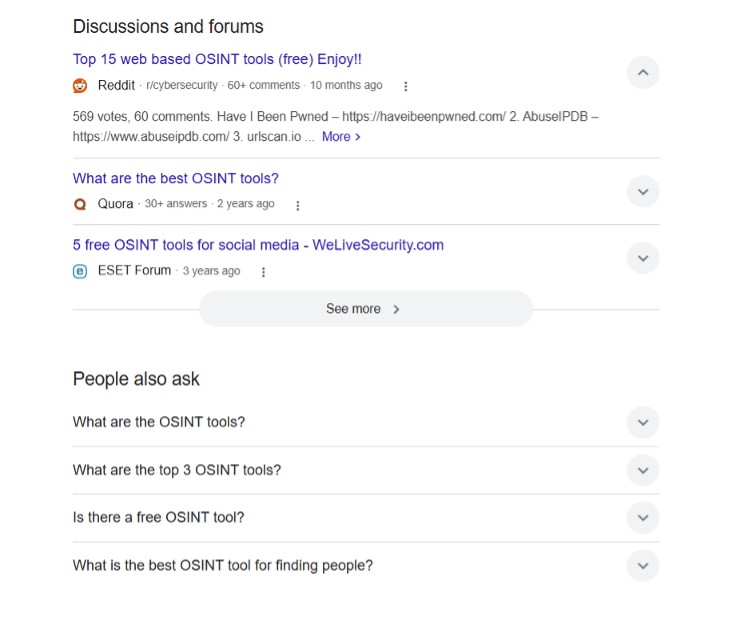
Google, of course, retrieved many more results – about eight million versus Marginalia’s 300 or so. Yet Marginalia’s results were, for want of a better description, more interesting. ‘Expert’ websites like technology or security pages were heavily represented amongst the sources, as were personal websites, blogs and Github repositories. Rather than wade through a few pages of ‘Top 10 OSINT Tools’ that, as an OSINT practitioner, I’m already familiar with, I discovered a few gems only a few results down (including the Github page for this neat little Web Check tool: https://web-check.xyz/).
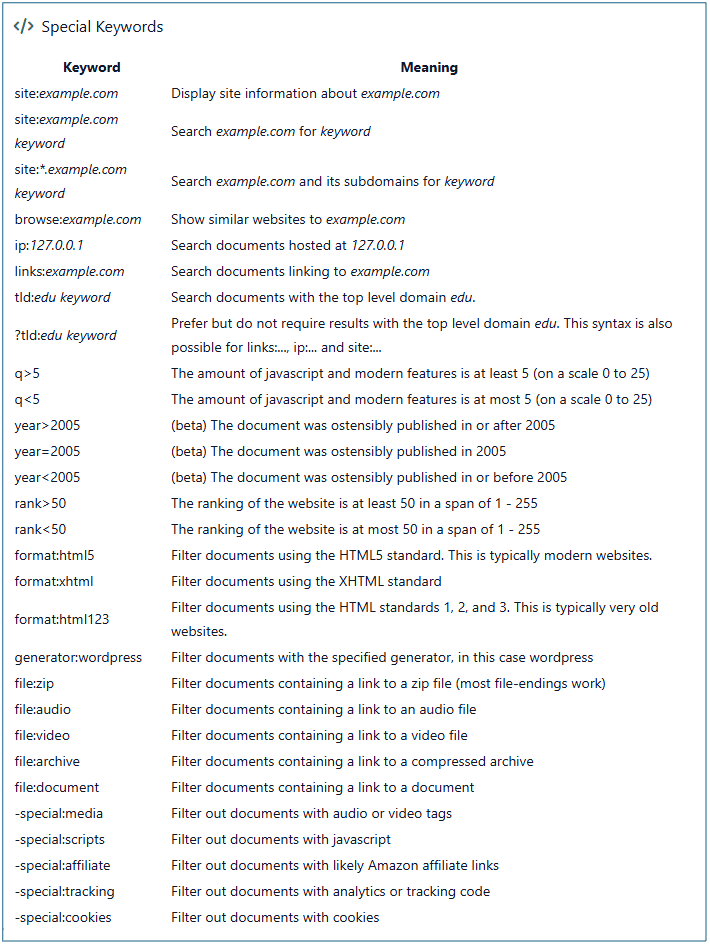
Marginalia also offers comprehensive filtering and advanced search operators – in many ways, it allows much more targeted searching than Google’s search operators.
None of the major search engines support IP-based searching, so it was a nice surprise to see that Marginalia has an ip: operator to retrieve documents hosted on a specific IP address. Results are still quite limited, but in the image below (using a Substack IP address) we can see that it does, in fact, work!
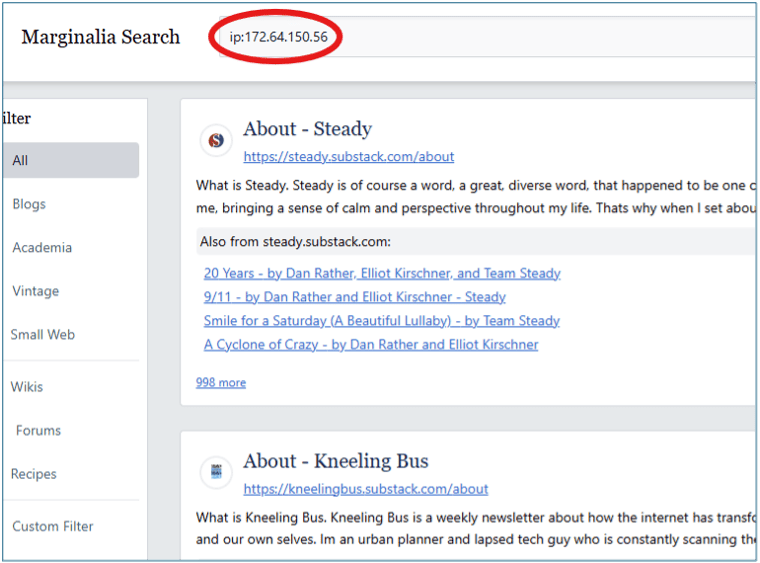
While Marginalia isn’t a replacement for Google (nor does it seek to be), it’s a fantastic resource for discovery, and it’s particularly suited to technology research, finding low-traffic blogs, and carving away generic results.
Good for:
- Technology pages and discussions
- Grey literature and academic content
- Small web (non-commercial part of the internet, including personal websites and blogs, hobby pages etc)
Not the right choice for:
- Commercial and highly trafficked websites
- Social media platforms
- Mainstream forums
- AI summaries and AI-enabled search
Boardreader
Boardreader is another niche search engine with its own crawlers and index. As suggested by the name, it indexes message boards and forums. The main use case is conversation discovery – Boardreader can sometimes unearth discussions that Google’s ‘Forum’ filter will ignore. It also indexes forums that Google doesn’t – the notorious 8kun message board is one example.
In our blog earlier this year on Reddit searching and monitoring we noted that Reddit is now only indexed by Google. As a result, Google is by far the best choice for retrieving results from Reddit. But what about other forums? After running searches for specific phrases across both Boardreader and Google (using Google’s built in ‘Forum’ filter), it became clear that, at least for the first few pages of results, Google tends to show a lot of content from Reddit – and not much content from anywhere else!
Below is a graph showing the sources for results from Google and Boardreader for an exact phrase search: “Blasts reported in Iran”.
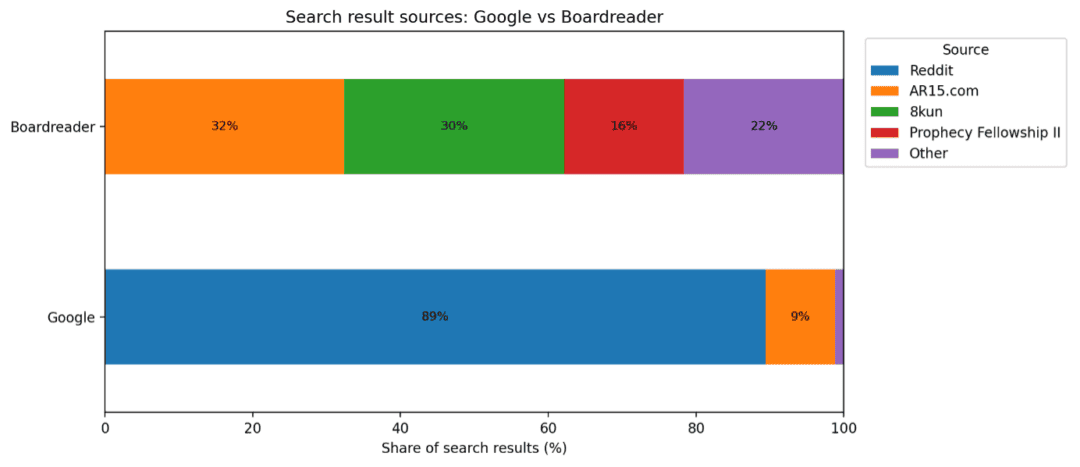
Boardreader is also useful for evading a few of Google’s nanny-ish peculiarities. For instance, while Google does index content from boards like 8kun, notorious for hosting extremist content, it generally doesn’t include them in result sets using the ‘Forums’ filter (see below).
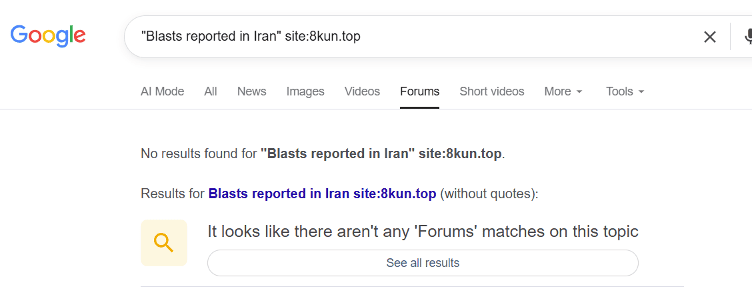
This quirk is more than a little frustrating for OSINT practitioners undertaking research on niche or extremist communities online and negates the usefulness of the ‘Forums’ filter for this kind of investigation.
Good for:
- Forums and message boards
- Monitoring extremist content
- Depersonalised results
Not the right choice for:
- General searching
- Reddit searching
Kagi Search
Kagi Search is touted as a privacy-focused, AI-enabled search option that prioritises quality over quantity. While it technically requires a paid subscription, at this point users can create an account using a temporary email address from a provider like 10 Minute Mail or Temp Mail to access a free trial of 100 searches.
Unlike mainstream search providers, Kagi promises to deliver unique, non-commercial results from different indexes. It has a few interesting perks:
- Kagi crawls archives of websites from the Internet Archive’s Wayback Machine, which mainstream search providers do not. Very useful for finding content that has been changed or deleted, especially since the deprecation of cached results from both Google and Bing.
- Kagi maintains its own non-commercial index called Teclis and a news-focused index called TinyGem (Kagi Search Quality).
- It retrieves results from a range of niche sources and other search providers via anonymised API calls.
- Results with lots of ad trackers are down-ranked to improve quality.
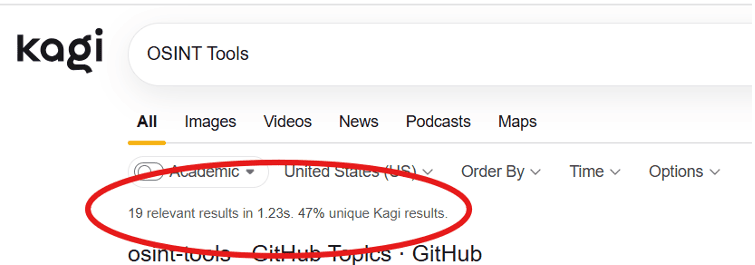
Searching for ‘OSINT Tools’ in Kagi retrieves only nineteen results – far fewer than both mainstream providers and ‘small web’ search engines. If we’re looking to cast a wide search net, this isn’t ideal. But the relevance and uniqueness of results is key, and Kagi highlights that nearly half of results are ‘unique’.
We ran a comparative search in Google (again, just using the simple query ‘OSINT tools’) and compared the first three pages of Google’s results to Kagi’s. While Google obviously retrieved a vastly larger result set, there were significant differences in the type of content and sources represented in the first ~20 results. There were only two overlapping results between the two search engines.
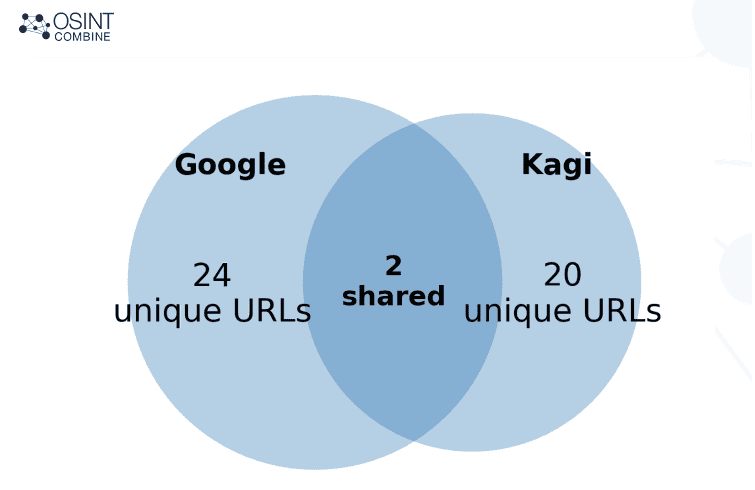
Google, broadly, ranked SEO and content marketing results quite highly, so these were over-represented in the results for the first three pages. Kagi, as promised, was better at delivering independent and specialist OSINT resources (though there were still some commercial results).
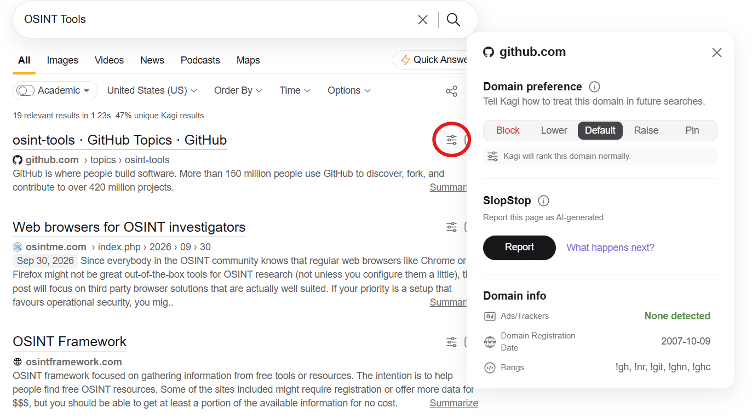
Another cool feature in Kagi is the ability to investigate domains and set preferences by clicking the filter button next to a result. You can see the info and options in the screenshot below, including the ability to change the rankings of domains in search results, and quickly check whether a website is using ads or trackers.
Kagi sports a robust set of filters, keyboard shortcuts and search operators to further refine search results if needed – check them out here: Kagi Search Operators
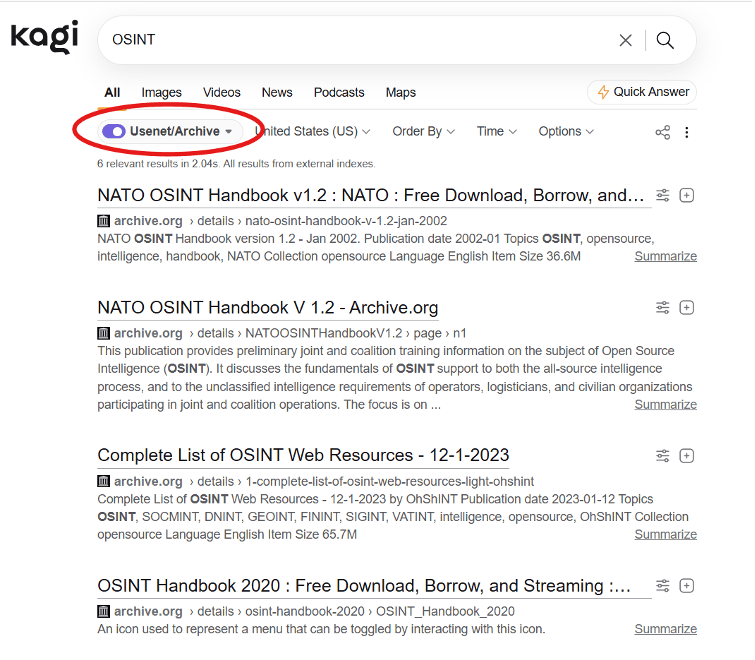
One of the most promising features by far is the ‘Usenet/Archive’ filter that retrieves archived results from the Wayback Machine. For any OSINT practitioner who has struggled with the Internet Archive’s reasonably limited search functionality for archived websites, the ability to conduct broad keyword searches for archived content is likely to be of interest. That said, result sets are still very small!
Since the free trial version of Kagi is limited, we’d suggest using this search engine sparingly for results that won’t be retrieved by other search engines.
Good for:
- Discovering independent/specialist content
- Understanding domains and setting preferences
- Retrieving archived results from Wayback Machine
Not the right choice for:
- Comprehensive result sets
- Free, unlimited searching.
Key Takeaways
In this blog we’ve looked at some ‘exotic’ search engine offerings and how they might cater to your OSINT requirements. While Google is still the best choice when it comes to sheer scale, other search engines and indexes
- European search engines Ecosia and Qwant give users greater control over their privacy while still retrieving mainstream results from major providers. As the European Search Perspective grows, both of these search engines are worth keeping an eye on.
- Self-hosted searching using SearNXG is a great option for OSINT practitioners who want control over their user data and result sets.
- For discovery of small web and non-commercial results, Marginalia punches above its weight. It’s open-source and free of pesky AI summaries, and doesn’t require any kind of account registration.
- While Google’s ‘Forums’ filter is great for retrieving results from mainstream message boards, OSINT practitioners looking for discussions in fringe and extremist communities will find value in Boardreader.
- Kagi promises both privacy and quality, but it only allows limited searching without a paid subscription. For niche data sources and archived results, it’s worth adding to your toolbox.
If you want to level up your information retrieval skills, check out our training offerings here: https://www.osintcombine.com/training or get in touch with us at [email protected].